
Discord welcome bot
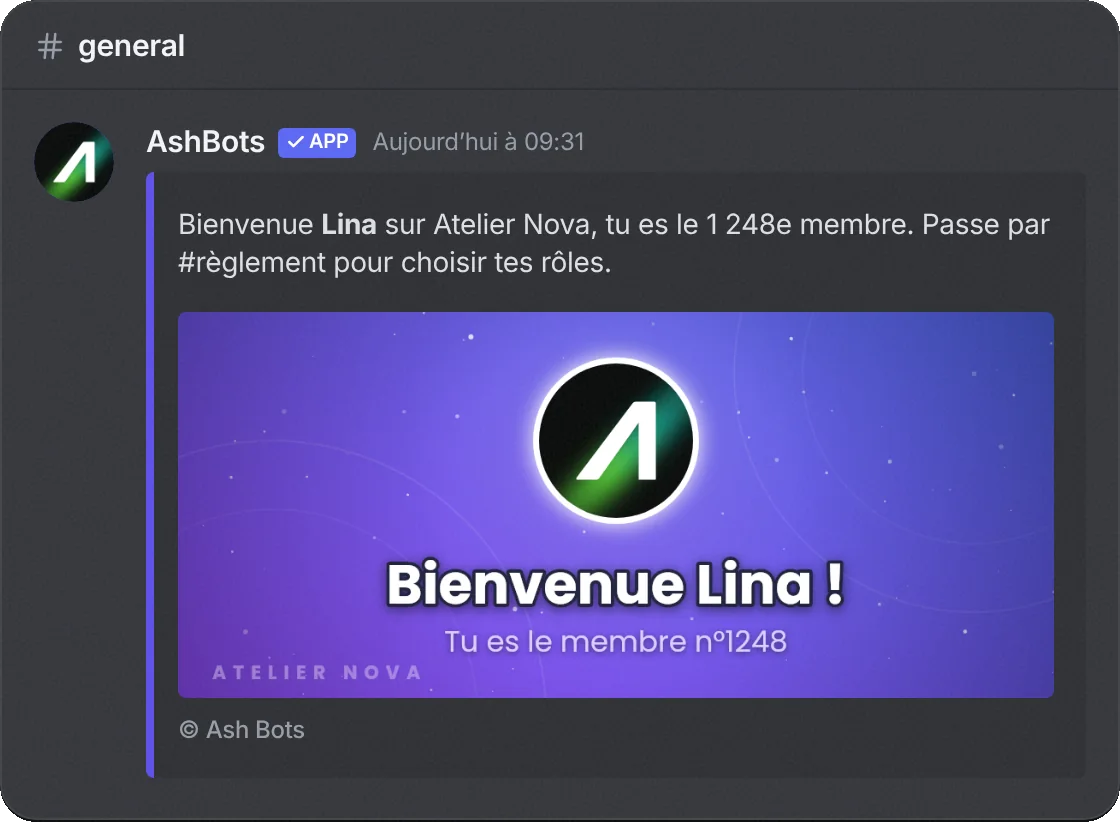
A join message with a real image generated in the member's name, which you compose on the dashboard: background, avatar, texts, fonts. Plus the leave message, the private message and roles on join.
- Free
- In French
- Configurable on Discord and on the web
- 349 commands
What AshBots does
The same settings on Discord and on the web, and image cards for welcome, levels and leaderboards.
Image card
You design the card on the dashboard: background image or gradient, avatar to position, texts with dozens of fonts. The preview follows live.
Join message
Embed, card or plain text, with variables: member mention, server name, member count, who invited them.
Leave message
The same settings, with a different text if the member was banned.
Direct message
A message sent privately to the new member, with a test button.
Automatic role
Roles given on join, with separate lists for humans and bots.
Multiple channels and languages
Extra messages, each with its own channel and card, for example an English welcome for a specific role.
Setup in 4 steps
From Discord with the commands below, or from the web dashboard with the same settings.
Add AshBots
Invite the bot to your server.
Set up the message
/welcomeopens the panel: choose the channel, style and text for joins, then the leave message and the private message.Design the card
On the dashboard, the Welcome card tool composes the image: background, avatar, texts. Save, and it's live.
Give a role on join
/autorolechooses the roles given to new members, with an optional delay.
The welcome message, the image card and roles on join are free, with no limit.
Frequently asked questions
How do you make a welcome message on Discord?
With a welcome bot. On AshBots, /welcome sets the channel and the text, and the dashboard designs the image card sent for every join.
Can the welcome image be customized?
Yes, entirely: uploaded background image, avatar position and size, texts, colours and fonts. The card is generated in each member's name.
Can you show who invited the member?
Yes, the {inviter} variable shows who invited them, and {count} the member count.
Can the bot give a role to newcomers?
Yes, /autorole gives one or more roles on join, and can give a returning member back the roles they had.
Go further
The same bot also does
A single bot to invite and configure, instead of one per need.